
Long-term cloud backup just $2.36/TB



Lower storage cost with offline archives
Moving data to offline storage reduces ongoing storage costs because it is designed to be rarely accessed. Archivst combines archive pricing with efficient transfer and retrieval workflows so you pay only what you need to get data back.
Lower monthly cost
Place hopefully never needed data in archival tiers to dramatically reduce monthly storage fees.
Reduced processing
Targeted restores and staged retrievals lower egress and processing charges.
Smaller carbon footprint
Archive storage requires minimal energy consumption compared with standard online storage.
Image compression
Choose lossless or lossy compression to greatly save on data costs and can tolerate to preserve lesser copies.
Image Deduplication
Choose to detects duplications and save on paying twice for the same data.
Change Frequency Tolerace
If frequently changed data must be archived, save on costs by delaying updates to a chosen interval.
Backing up for emergencies?
If you are expecting to need your stored data as a the worst case scenario, why pay the high cost of keeping it online. Archivst offers cloud storage in the most affordable way and files are never overwritten, protecting you from encryption by ransomware.
Why Offline / Write‑Only?
A cloud attack, sync mistake or encryption event should not destroy your history. Archivst keeps immutable point‑in‑time versions without exposing cold data to the internet.
Offline Encrypted Storage
Data moved offline & encrypted. Bring it online only when you explicitly need it.
Low Carbon Footprint
Archival tiers reduce energy usage & cost vs normal accessable cloud storage.
Point-in-time Versioning
Point‑in‑time recovery – even after ransomware impact.
Time‑Based Restore
Select a date; archive restore securely for a controlled download.
Built for what you cannot lose
Archivst is the write‑only archive service for when somone needs proof, provenance, and peace of mind. Minus the large monthly bill.
Media masters preserved
Keep RAW footage, stills and project files in a tamper‑proof archive or just in case light-weight compressions.
Compliance ready
Retain unchangeable evidence for audits or legal holdings with clear retrieval paths and version history.
Founder's hard drive, safe
Protect laptops and NAS devices from ransomware by shipping snapshots to an offline, immutable tier.
How It Works
A short step-by-step guide to backing up your data into Archivst's archive storage.
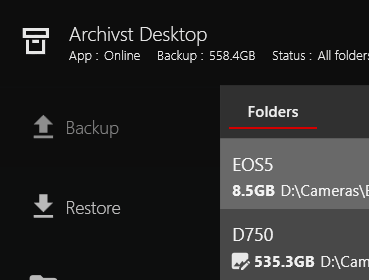
1. Install Archivst Desktop
Download and install the Archivst Desktop App. It runs in the background and manages secure transfers to your local and cloud storage.
2. Select Folders to Archive
Pick the folders or drives you wish to protect. Archivst manages changes and queues up the files according to your schedule. You will need to decide carfully how you want changes and photos to be managed.
3. Initial Upload
The first backup uploads all the chosen files into the cloud. These files cannot be overwritten and only deleted after a period and your explicit approval.
4. Offline Storage
Data is stored in an offline archival state which uses very little effort maintain. If the worst happens you request it comes back online.
5. Request Restore
When you request the data back, Archivst restores the data and provides secure download options. You will be charged a premium to do this, ultimately it will still be a far lower cost than guaranteed higher monthly charges
6. Verify & Monitor
Upto 24 hours later you confirm the files are back online and are able to download your data.
Q & A
Today we operate regions in Ireland and the US (East/West).
Archivst stores your encrypted objects in specific cloud datacentres. You can choose one of those locations that best meets your regulatory needs.
Files are uploaded using special storage from the cloud provider and Archivst adds metadata to aid replication. We never keep unencrypted copies of your data, you can choose your own password to encrypt your data, access is restricted to your account and TLS is used for all transfers.
Security is the core focus of Archivst. All data in transit uses TLS and server-side encryption protects data at rest by default.
You can optionally enable client-side (zero‑knowledge) encryption by supplying a passphrase.
Archivst never sees your unencrypted key so only you can decrypt your files (note: losing the passphrase means the data cannot be recovered). We also support multi-factor authentication for account access, role-based access controls, and audit logging so account actions can be reviewed. It all adds up to robust security you can count on.
Archivst stores data in major hyperscale provider datacentres
that implement industry-standard physical security: controlled access, monitoring, environmental controls, and redundancy.
Yes. By default Archivst applies server-side encryption using strong keys managed by the cloud provider.
For additional control you can enable customer‑managed keys or use client-side encryption: the desktop app can encrypt files locally with a passphrase or key before upload, giving you end-to-end security.
Keep in mind client-side encryption gives the strongest privacy guarantees but also means the system can not recover your data if the passphrase is lost, there is no way for Archivst to recover the encrypted content.
If your prepaid balance drops below the threshold we will notify you by email.
Uploads and new archival actions are paused to avoid unexpected charges until you top up.
We provide a grace period so you can top up and resume without service interruption; the exact length of the grace period depends on your plan. During any pause existing archived data remains retained according to your retention policy, but new writes are halted until the balance is sufficient.
If the balance cannot be restored after repeated notifications we follow the account policies described in our Terms of Service: we give clear warnings, attempt contact, and allow a final remediation window.
If no action is taken and the account remains delinquent, we may begin permanent deletion of archival data to avoid accruing storage liability. We recommend topping your account for the year and set an optional alert that the top will not cover the year to avoid reaching this state-; take action immediately if your account is at risk.
Archivst is designed to help recover from malicious events.
We keep immutable point‑in‑time versions of files in the cloud so you can roll back to a known good state prior to compromise.
In the event of ransomware or malicious deletion, isolate your system, identify the last known clean time, submit a restore request through the desktop app or portal. If you use client-side encryption, ensure your decryption keys are secure and accessible for the restore.
Yes — Archivst retains versions, so each retained version consumes storage.
We use compression and deduplication to reduce redundancy, but frequently changing large files (for example, VM images or database files) can still incur higher costs because many versions will be stored. We do not recommend backing up these types of file very often.
To reduce costs: Set a long change interval if your folder includes frequently changing files. Estimated storage usage in the app will give you an idea of of cost.