
A cloud backup service letting you take control of the costs with the peace of mind of cloud storage for if the worst happens.
Built for Just-In-Case
Archivst has been designed to be a just in case backup cloud service, without the high monthly prices and extra tools to save what you'd like'.
- Immutable backups that resist ransomware and accidental overwrites.
- Automatic versioning so last months’s edit is always recoverable.
- Transparent, pay-as-you-need pricing that keeps budgets manageable.
Applications
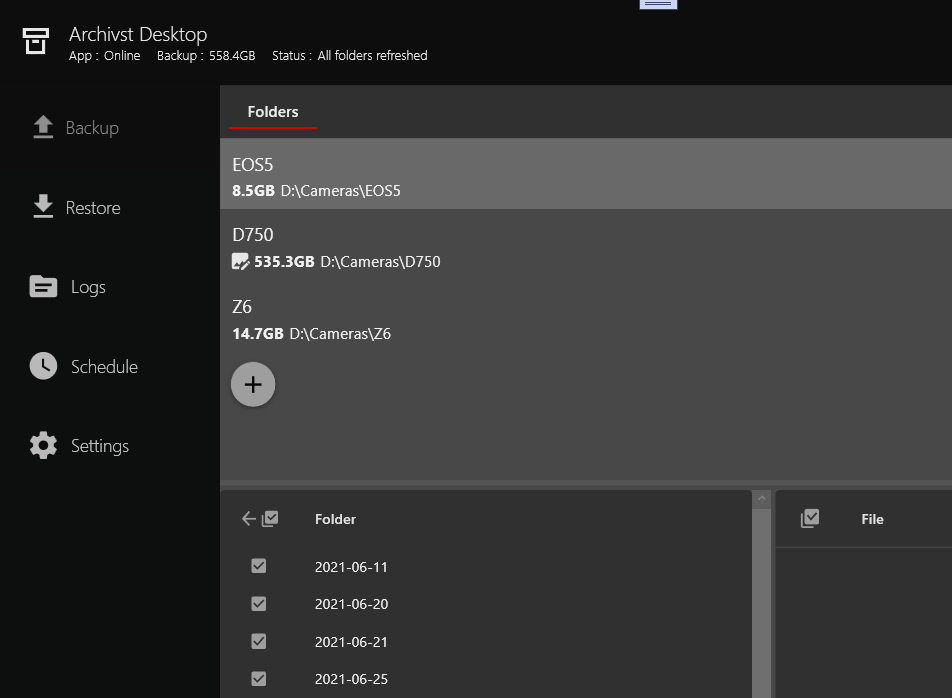
Archivst Desktop
Archivst Desktop will let you easily configure a backup on the folders you want to protect. Giving you tools to encrypt, compress, deduplicate and limit frequently changing files. It will quietly sit in the background and schedule backups to your drives and servers and cloud. If you need to restore the data, it will manage getting cloud data back too.
Archivst Service
Archivst Desktop schedule tasks for Archivst Windows Service to perform backups. Designed to be lightweight and not interrupt a user experience.
Features
Backup Scheduling
Camera RAW File Conversion
Point-in-time Restore
File Change Delay
User Encryption
Deletion Protection
Deduplication
Image Shrinking and Compression
Archivst CLI
A powerful command-line interface for automating backups, managing encryption keys, and restoring archived files. Perfect for scripting, server environments, and advanced users who prefer terminal-based workflows.
archivst decrypt scan --path ./downloads
                        archivst decrypt run --path ./downloads --out ./restored
                        archivst keys list
                        archivst keys add --generate --name "backup-key"
Features
Decrypt Hydrated Files
Key Management
Batch Processing
Scriptable Workflows
Point-in-time Restore
Cross-Platform Support
Local-First, Offline-Second
Archivst gives you the tools to easily backup to another drive or a FTP server then a cloud backup would be the just-in-case option. Cloud backup is the easiest way to give you that peace of mind just in case.
Restores take time to get that data back to you as the data is not connected — that’s how costs are kept low. Archivst Cloud works best as your 2nd line of backup while a fast local backup can handle normal situations.
How It Works
A short step-by-step guide to backing up your data into Archivst's archive storage.
1. Install Archivst Desktop
Download and install the Archivst Desktop App. It runs in the background and manages secure transfers to your local and cloud storage.
2. Select Folders to Archive
Pick the folders or drives you wish to protect. Archivst manages changes and queues up the files according to your schedule. You will need to decide carfully how you want changes and photos to be managed.
3. Initial Upload
The first backup uploads all the chosen files into the cloud. These files cannot be overwritten and only deleted after a period and your explicit approval.
4. Offline Storage
Data is stored in an offline archival state which uses very little effort maintain. If the worst happens you request it comes back online.
5. Request Restore
When you request the data back, Archivst restores the data and provides secure download options. You will be charged a premium to do this, ultimately it will still be a far lower cost than guaranteed higher monthly charges
6. Verify & Monitor
Upto 24 hours later you confirm the files are back online and are able to download your data.
Currently Archivst is Windows only, there are plans to support Mac, Linux, NAS drives and Smartphones.